
THE CONTROL LAB
Three moves that make the difference
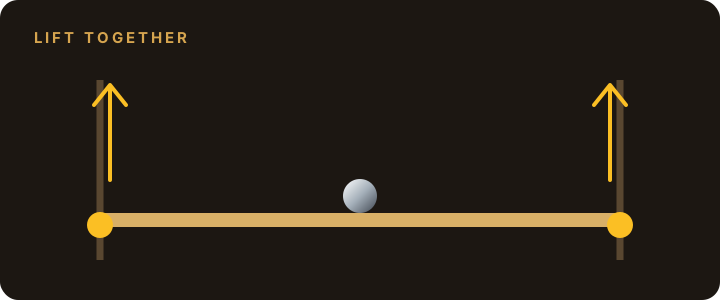
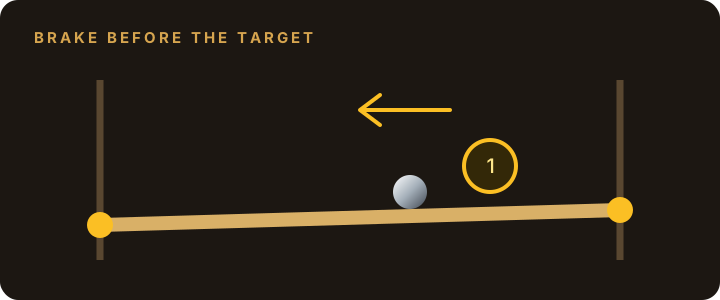
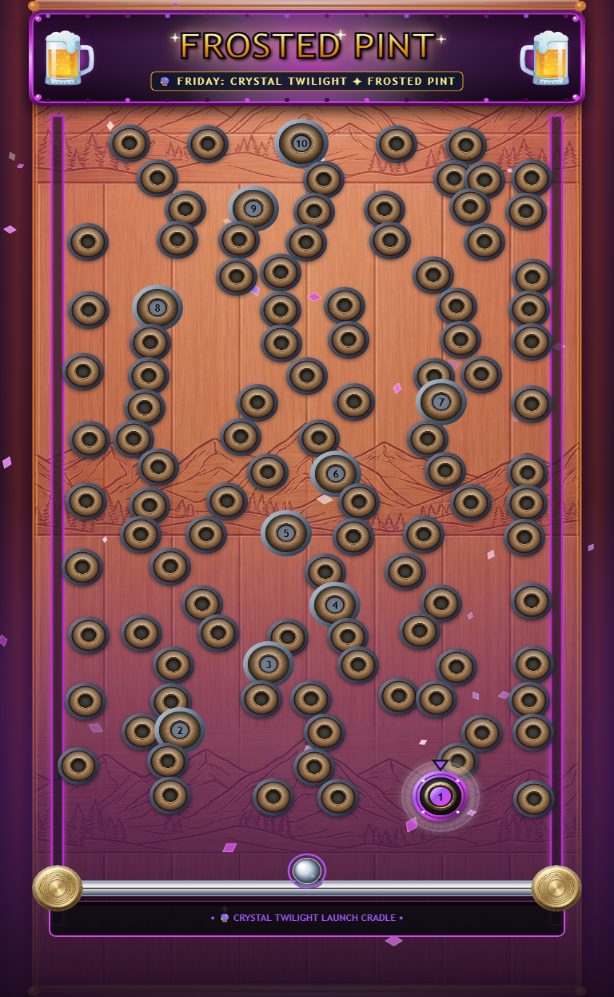
The controls move the bar’s ends independently. These diagrams show the basic moves; the game image below shows how the targets and hazards look during play.

Read the board before the climb
The active numbered target glows. A dark hole or a target that is not currently active costs a ball. Look for a route that lets you change height without crossing hazards.
On a phone, keep your thumbs on the separate side controls. On desktop, combine W/S with the arrow keys to adjust both ends together.
Recover without rushing
If the ball builds too much speed, stop chasing the target and work on reducing the slope first. After a miss, use the fresh ball to make a controlled approach: cleared targets and earned points remain, while the streak starts over.
Why a clean run scores more
The first three targets without a miss earn 100 + 400 + 900 = 1,400 points. If you miss after target 2, target 3 starts a new streak and earns 300 instead of 900. A slower clean approach can therefore beat a faster run with repeated misses.
1. Start your run
Open the game and press the Play button. A normal run starts with three balls and a three-minute timer. The daily date selects your board; everyone playing that date gets the same layout. You can select an earlier board for another challenge.
2. Control each end of the bar
On a phone or tablet
Use the left and right controls beside the board. The up and down buttons move that end of the bar. You can also drag its lever handle to adjust the height. The two ends move independently.
On a computer
Use W and S for the left end. Use ↑ and ↓ for the right end. Raising one side makes the ball roll toward the lower side.
Small adjustments help you line up a target. Level the bar to slow the ball before it reaches the opening; a ball traveling too fast may roll past.
3. Clear targets in order
Guide the ball into the illuminated target marked 1, then 2, and continue through 10. The active target glows to show you where to aim next. Other openings are hazards: sinking into one costs a ball and resets your scoring streak.
The game ends when you clear all ten targets, lose your last ball, or run out of time.
4. Build your score
A target awards 100 × its target number × your current streak. Each consecutive successful target increases the streak by one; a miss resets it.
For example, the first target in a clean run earns 100 points, the second earns 400, and the third earns 900. Clearing all ten without a miss earns 38,500 target points.
A win also earns a time bonus: 50 points for each second remaining, including fractions of a second, rounded down to a whole point. The remaining time freezes when you win.
5. Put your name on the leaderboard
After a run with points, enter an arcade name of up to 30 characters, choose one of 12 avatar stamps, and press Post Score. No sign-in is needed. Use a nickname you are comfortable sharing publicly.
Only your best score from that browser counts for each board date. Ties go to the faster in-game run, then the earlier posted result. The public list shows the top 20 players, along with your own best rank.
Open the trophy icon, the Scores button, or View Daily Leaderboard to see the competition before or after playing. The game pauses while its menus are open. Daily boards reset at midnight Pacific time; earlier boards keep their own rankings.
Sound, themes, and a quick tip
Music starts off. Turn it on in the game menu if you would like a soundtrack. The menu also includes the visual theme selector and the in-game playing guide.
Bring both ends of the bar up together to move higher without adding much tilt. Tilt briefly to move sideways, then level the bar as you approach a target.